How to wind the mainspring
This watch is an automatic winding type (with manual winding function).
The mainspring can be sufficiently wound automatically by natural movement of the arm while normally worn on the wrist. In addition, it can be wound by turning the crown.
Please see the power reserve indicator to check the level of the remaining power.
How to read the power reserve indicator
When using a stopped watch, it is recommended to turn the crown to wind the mainspring. When winding the crown, ensure the screw lock crown is unscrewed and turn the crown at the normal position clockwise (12 o’clock direction) slowly. Note that if the crown is turned counterclockwise (6 o’clock direction), the mainspring of the watch will slip and not be wound. Seven and a half rotations of the crown will provide the power to drive the watch for approximately ten hours.
If you wear the watch for twelve hours per day consecutively for three to five days, the watch will be fully wound.
Under a low-temperature condition (below 0°C), always keep at least one-sixth of the watch power shown by the power reserve indicator.
CAUTION
For models with a screw down crown, remember to screw the crown in.
How to set the time
-
Pull out the crown to the first click.
-
Turn the crown counterclockwise (6 o’clock direction) to advance the hands to set the current time.
-
Push the crown back into the normal position. The watch starts operating.
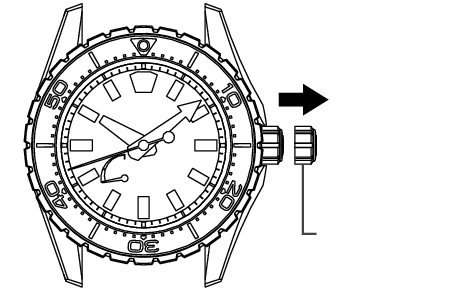
First click position
(If the watch is equipped with the screw down crown, unscrew the crown before pulling it out.)
CAUTION
For models with a screw down crown, remember to screw the crown in.
Tips for more accurate time setting
To ensure effective operation of the Spring Drive mechanism, observe the following instructions when you set the time.
-
Before setting the time, make sure to wind the mainspring sufficiently.
-
When starting to use a watch after it stops, wind the mainspring sufficiently. To set the time after that, wait for approximately 30 seconds after the seconds hand starts moving, then pull the crown out to the first click.
-
The seconds hand will stop moving when the crown is pulled out to the first click. Do not stop the movement of the seconds hand for longer than 30 minutes. If the stoppage of the seconds hand movement exceeds 30 minutes, push the crown back in, and wait for approximately 30 seconds after the seconds hand restarts moving, and then set the time.
(Ensure that the power reserve indicator is showing a fully wound state.)
CAUTION
For models with a screw down crown, remember to screw the crown in.